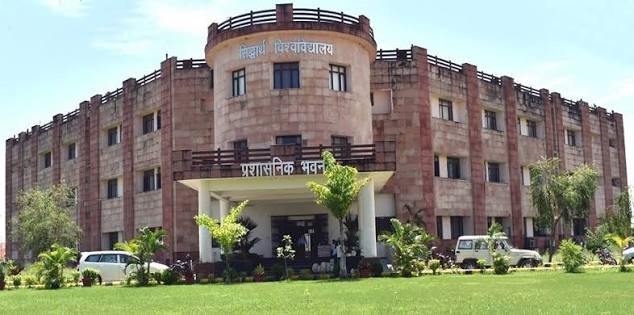
Siddharth University, Kapilvastu is a state university in Siddharth Nagar, Uttar Pradesh, close to the India-Nepal border. Established in 2013, it has grown into an important higher-education centre for the eastern Uttar Pradesh region. The university’s own current profile describes a 53-acre campus with faculties covering Arts and Humanities, Commerce and Management, and Science, along with 24 departments and a large network of associated colleges. This means a student may be applying either to a university department on the main campus or to an affiliated college, and the online process must be completed for the correct organisation unit.
The university’s digital systems are also divided by purpose. For the 2026-27 admission cycle, applicants use the Siddharth University e-Samarth admission portal, where profile registration generates a Siddharth University Registration Number (SURN) before programme applications are submitted. Examination results can appear through the university’s ERP result system as well as the Samarth student portal, because several current 2026 result notices specifically refer students to Samarth. Enrolled students use the Samarth Student Portal for account-based academic services. The guide below keeps admission, result checking and student login separate so that applicants do not confuse one set of credentials with another.
Quick About
| Particular | Details |
| Official name | Siddharth University, Kapilvastu |
| University type | State university |
| Established | 2013 |
| Main campus | Kapilvastu, Siddharth Nagar – 272202, Uttar Pradesh |
| Academic structure | University departments and a large network of associated colleges |
| Main website | https://www.suksn.edu.in/ |
| Admission portal | https://suksnadm.samarth.edu.in/ |
| Result portal | https://erp.suksn.in/resultview.aspx and https://erp.suksn.in/SUK_Result_Portal.aspx |
| Student portal | https://suksn.samarth.edu.in/ |
Courses and Admission Routes
Siddharth University offers undergraduate, postgraduate, professional and research programmes through its campus departments and affiliated colleges. The available mix includes arts, humanities, science, commerce, management, law, education and other programmes notified for the session. Because affiliated colleges and university departments are both covered by the admission system, the same course name can be available in more than one institution or organisational unit.
For the current admission system, the university requires a candidate to create an e-Samarth profile and obtain a SURN before applying to a programme. While applying, a candidate must identify whether the choice is an Institution Department on the university campus or a College. NEP-based programmes can also require subject-group, major and minor choices. The current programme notice and admission dashboard should therefore be treated as the controlling sources for eligibility, subject combinations, seat availability, merit rules and deadlines.
Siddharth University Kapilvastu Admission Procedure
1. Create the admission profile first. Open https://suksnadm.samarth.edu.in/ from the official university admission page and complete New Registration with the candidate’s own active email address and mobile number.
2. Generate and save the SURN. Complete the profile-registration stage carefully. The Siddharth University Registration Number is an important identity for later programme applications and should be retained with the login details.
3. Choose the correct organisation unit. After login, use Apply for Programme and select Siddharth University. Choose Institution Department for a university-campus programme or College when applying to an affiliated college.
4. Select the programme and subject combination. Choose UG or PG level as applicable, then select the exact programme. For NEP stream-based courses, complete the major, minor or group selections shown by the portal.
5. Fill personal and academic details. Enter name, date of birth, qualifying examination, marks, category and other details exactly as they appear in the supporting certificates.
6. Upload the required records and review the form. Upload mark sheets, photograph and other certificates in the prescribed format. Preview every entry before confirming because incorrect academic or category information can affect merit or verification.
7. Pay the application fee and retain proof. Use the payment facility inside the official Samarth admission system. Save the application number, payment reference and submitted form.
8. Track merit, selection and final reporting. Check the university website, applicant dashboard and the concerned department or college for merit lists, interview/GD instructions where applicable, document verification and final fee-payment deadlines.
Documents Commonly Required for Admission
The exact checklist depends on the programme, department or affiliated college, but candidates commonly need:
• Class 10 certificate or another accepted proof of date of birth
• Class 12 mark sheet and pass certificate for undergraduate admission
• Graduation mark sheets and degree or provisional certificate for postgraduate admission
• Recent photograph, signature and government-issued identity proof
• Category, EWS, income, domicile, disability or other reservation/claim certificates where applicable
• Transfer, migration and character/conduct certificates when required at final admission
• Entrance-test, interview or other programme-specific records where the current notice asks for them
• Printed application, SURN details, allotment/selection notice and payment receipts
Candidates should keep originals ready for verification. A profile successfully created on Samarth does not by itself confirm admission; the programme application, merit/selection process, document verification and final fee payment must also be completed.
How To Check Siddharth University Kapilvastu Result
1. Start from the official university Results link. Open https://www.suksn.edu.in/ and check the latest examination/result notice for the exact course, semester and session.
2. Identify whether the result is on ERP or Samarth. Many NEP/CBCS results are available through https://erp.suksn.in/resultview.aspx, while several current 2026 notices state that particular examinations are handled through the Samarth portal.
3. For the ERP result search, enter the full examination details. Select session, category, semester/type and course, then enter the roll number and enrolment number exactly as issued by the university.
4. For a Samarth result, sign in with the student account. Use https://suksn.samarth.edu.in/ and open the result/assessment area provided for the enrolled student.
5. Verify and save the record. Check the student identity, programme, semester, subject details, marks/grades and result status before saving the provisional result for reference.
A student should not assume that a result is missing simply because it does not appear on the older ERP lookup page. Siddharth University has been moving some examination activity through Samarth, so the wording of the current university result notice is important. For formal purposes, use the official marksheet, grade sheet, transcript or degree required by the receiving institution.
Siddharth University Kapilvastu Student Login
The Samarth Student Portal is the main authenticated login for enrolled students. It is different from the admission portal used to create the applicant profile and submit programme applications.
1. Open the Student Portal. Go to https://suksn.samarth.edu.in/ and confirm that the page identifies itself as the Student Portal.
2. Enter the enrolment-based username and password. Use the credentials registered or issued for the student account. Do not assume that the admission-portal password will always be the same.
3. Use New Registration only when instructed. Students who have not activated their Samarth student account should follow the university’s registration instructions rather than creating multiple accounts with different details.
4. Use Reset Password if access is lost. Recover the account through the official portal and registered contact details instead of sharing credentials with an unofficial agent.
5. Check the student profile after login. Verify enrolment number, programme, college/department and semester before using examination, result or fee-related services.
When a particular service remains on the university ERP rather than Samarth, follow the link named in the current university notice. The two systems can coexist for different batches or examination processes.
Important Checks Before Paying Any Fee
• Use only links reached from suksn.edu.in, suksnadm.samarth.edu.in, suksn.samarth.edu.in or another portal specifically named by the university.
• Match the SURN/application number, programme, department or college and fee purpose before paying.
• Do not assume that profile registration alone completes the programme application or reserves a seat.
• If a bank debit occurs but the portal remains pending, save the transaction reference and contact the authorised support channel before paying again.
• Keep application, selection, admission and examination receipts until the corresponding record is fully updated.
Frequently Asked Questions
Q1. Why do some Siddharth University results open in Samarth while others use the ERP result portal?
The university is using more than one examination system during the transition to Samarth. The current result notification for the exact course and semester should decide which portal the student uses.
Q2. Can one SURN be used to apply for more than one programme?
The university’s admission instructions allow multiple programme applications under one registration, subject to the current limit and eligibility conditions shown in the portal. Applicants should still submit and pay for each required programme application correctly.
Q3. What is the difference between Institution Department and College in the admission form?
Institution Department means a programme offered directly on the Siddharth University campus. College refers to an affiliated college. Choosing the wrong organisation unit can send the application to the wrong institution.
Q4. What should a student do if the ERP result says the roll number or enrolment number is invalid?
First recheck the session, category, semester and course selections. Then confirm whether the latest university notice directs that examination to Samarth. If the result has been declared and the correct portal still rejects the details, contact the examination section or college with the admit-card information.
Q5. Can an applicant change a wrong mobile number or email after Samarth registration?
The admission instructions stress using the candidate’s own valid email and mobile number because they are central to login and communication. If an incorrect or inaccessible contact has already been registered, the candidate should use the official admission help route instead of opening a second conflicting profile.
Q6. Is an online result sufficient for migration, employment or higher studies?
The online result is useful for immediate reference, but another institution or employer may require an official marksheet, transcript, provisional certificate or degree. Students should obtain the formal document required for that purpose.