Ranchi University is a major public university in Jharkhand, established in 1960 and serving students through university departments, constituent colleges and affiliated colleges. For applicants and enrolled students, the important point is that all online work is not handled on one website. Admission and several student-registration services are routed through the Jharkhand Chancellor’s Portal, while examination notices, results and exam-related services are linked from the Ranchi University website. This guide explains which official portal to use, how the admission process normally moves from registration to document verification, and how students can locate results without relying on unofficial result websites.
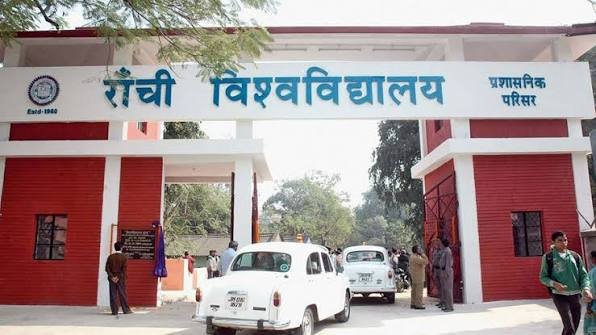
Quick About: Ranchi University
| Particular | Details |
| Official name | Ranchi University |
| Common name | Ranchi University |
| University type | State public university |
| Established | 1960 |
| University address | Shahid Chowk, Ranchi – 834001, Jharkhand |
| Academic reach | University departments, constituent colleges and affiliated colleges |
| Main website | ranchiuniversity.ac.in |
| Admission portal | universities.jharkhand.gov.in (Chancellor Portal) |
| Examination portal | exam.ranchiuniversity.co.in |
| Result page | ranchiuniversity.ac.in/exam_results |
Courses and Admission Routes
Ranchi University offers undergraduate, postgraduate, vocational, professional and research programmes through its departments and colleges. The admission route depends on the course and the admission session. For many UG and PG programmes, applicants are directed to the Jharkhand Chancellor’s Portal. Some self-financing, professional or college-level programmes may also have an entrance test, merit list, interview or a separate verification schedule.
Applicants should always start with the current admission notice on ranchiuniversity.ac.in and then follow the portal named in that notice. The current notification controls eligibility, subject requirements, reservation, college choices, document format, application fee, merit-list rules and reporting dates. A previous year’s admission sequence should be used only as a general reference.
Ranchi University Admission Procedure
1. Check the current admission notice. Open ranchiuniversity.ac.in and read the notice for the exact programme and session. Confirm whether the application is to be made through the Chancellor Portal or through a department, institute or college-specific process.
2. Create or access the student account. For admissions routed through the Jharkhand Chancellor Portal, open universities.jharkhand.gov.in and use the student registration or login facility. Use the candidate’s own mobile number and email because account recovery and admission messages may depend on them.
3. Select the correct university and programme. Choose Ranchi University and then the relevant course, college or department options shown for that admission cycle. Do not assume that every affiliated college or subject will be available in every round.
4. Enter academic and category details carefully. Fill in board or university information, marks, subjects, year of passing and reservation details exactly as supported by certificates. A wrong category or marks entry can affect merit calculation and document verification.
5. Upload the required records. Upload the photograph, signature, mark sheets and category or reservation certificates in the prescribed size and format. If the portal asks for a recent certificate, an older document may not be accepted merely because the category is correct.
6. Pay the application fee through the official portal. Check the candidate name, programme and application details before payment. Save the transaction reference, payment receipt and a screenshot of the successful status until the admission process is over.
7. Submit the form and save the application details. Review the complete application before final submission. Download or print the submitted form and retain the application number, username and password. These details may be needed for merit lists, corrections, counselling and admission.
8. Follow selection and document-verification instructions. Check merit lists, selection lists and college or department notices regularly. If selected, complete fee payment and physical or online document verification within the stated deadline. Selection in a list does not by itself complete admission.
Documents Commonly Required for Admission
The exact document list changes by programme, college and candidate category. Commonly required documents include:
- Class 10 certificate or another accepted proof of date of birth
- Class 12 or other qualifying examination mark sheet and pass certificate
- Graduation mark sheets and degree or provisional certificate for PG admission, where applicable
- Transfer certificate, migration certificate and character or conduct certificate, when required
- Submitted application form, selection or allotment letter and payment receipt
- Government-issued identity proof and recent photographs
- Caste, EWS, income, domicile, disability or other reservation certificates, where applicable
Candidates should take originals as well as the required photocopies for verification. A reservation or eligibility claim entered online can be rejected if the supporting certificate is missing, expired or not in the format required by the current notice.
How To Check Ranchi University Result
1. Open the official Ranchi University website. Go to ranchiuniversity.ac.in and use Examination > Examination Results. The university also places an Examination Results shortcut on the main website.
2. Identify the correct result notice. Match the course, semester or year, examination session and result type carefully. Regular, backlog, professional and special examination results may be published as separate notices.
3. Open the relevant result link or notice. Some results are published through a result notice or press release, while related examination services may lead to the official examination portal at exam.ranchiuniversity.co.in.
4. Check the student and examination details. Where an individual result page is provided, enter only the enrolment, roll or registration details requested by that official page. On a published result notice, verify the course and session before relying on it.
5. Save the result for immediate reference. Download the result page or notice and keep a copy. For formal use, obtain the university-issued mark sheet, grade card or certificate through the prescribed university or college process.
A web result or published result notice should be treated as an immediate academic reference, not automatically as a replacement for the formal mark sheet. If a result is withheld, a paper is missing, or the student’s details are wrong, contact the college examination section or the university examination branch with the roll or enrolment number and supporting records.
Ranchi University Student Login
Ranchi University students may use more than one official login depending on the task. The Jharkhand Chancellor Portal provides student login functions connected with admission and university-registration services, while Ranchi University separately links an Examination Portal for examination-related work.
1. Open the portal required for the task. For admission or Chancellor Portal services, use universities.jharkhand.gov.in. For examination services, follow the Examination Portal link from ranchiuniversity.ac.in rather than using a search-engine advertisement or third-party page.
2. Choose Student Login where applicable. On the Chancellor Portal, use the student login and enter the username and password created or issued during registration, along with the validation details requested on the page.
3. Use account-recovery options instead of creating another account. If the username or password is forgotten, use the official Forgot Username or Forgot Password facility. Duplicate registrations can make application tracking more difficult.
4. Check the profile before submitting a service request. Verify the student name, course, college, session, registration details and mobile number before paying a fee or submitting an examination or registration form.
5. Keep proof of every completed transaction. After any payment or form submission, save the acknowledgement, transaction number and final status page until the corresponding university record is updated.
Students should never share passwords, OTPs or payment details with agents. If the registered mobile number or email is no longer accessible and recovery fails, contact the concerned college or university office with identity and registration proof.
Important Checks Before Paying Any Fee
- Confirm that the admission page is the Jharkhand Chancellor Portal or another portal linked from the official Ranchi University website.
- Match the candidate name, university, programme, college choice and application number before paying.
- If money is debited but the portal shows pending, do not immediately repeat the payment; first check the payment-status or grievance option.
- Save the bank reference, transaction ID, amount, date and screenshot until the status becomes successful.
- Read the current notice for correction windows, admission deadlines, cancellation rules and any fee-refund conditions.
Frequently Asked Questions
Q. Is registration on the Jharkhand Chancellor Portal enough to secure admission to Ranchi University?
No. Registration only places the application into the admission process. The candidate must satisfy eligibility, appear in the applicable merit or selection process, complete document verification and pay the admission fee within the stated deadline.
Q. What should an applicant do if marks or category details were entered incorrectly after submission?
Check whether the current cycle provides an edit or correction window. If the form is locked, contact the Chancellor Portal help facility or the Ranchi University admission office with the application number. Do not create a second application unless official instructions permit it.
Q. Why can a college admission process differ even when the college is under Ranchi University?
Some programmes or colleges may have an additional entrance test, subject-specific selection, document verification or separate admission schedule. The Ranchi University notice and the concerned college notice should therefore be read together.
Q. What should a student do if the fee is debited but the application still shows unpaid?
Keep the bank proof and transaction reference and use the official payment-status or grievance facility. If the deadline is close, report the issue in writing to the relevant admission or examination authority so there is a dated record of the problem.
Q. Where should a student check Ranchi University results first?
Start from ranchiuniversity.ac.in and open Examination > Examination Results. This reduces the risk of opening an old or unofficial result page and also helps the student match the correct course, session and examination notice.
Q. What if a Ranchi University result is withheld or a subject is missing?
Verify the course, semester and roll or enrolment details first. Then contact the college examination section with the admit card and fee proof. The college can identify a pending marks, registration or eligibility issue and forward the case to the university examination branch if required.
Q. Is a result downloaded from the website the same as the official mark sheet?
Not necessarily. The online result is useful for immediate reference, but an employer or institution may require the formal university mark sheet, grade card or certificate. Students should obtain the official document when it is required.