Bodoland University is a state university at Rangalikhata in Kokrajhar, Assam. It was established under the Bodoland University Act, 2009 by upgrading the Kokrajhar campus of Gauhati University into a full-fledged university. The institution serves students through university departments as well as affiliated colleges and offers postgraduate, integrated, professional, teacher-education, diploma and research programmes. Its 2026 admission notices show that different programmes can follow entrance tests, merit lists, spot admissions or course-specific counselling.
The university uses more than one digital route. Admission notices, merit lists and result notices are published on buniv.edu.in, while the university also links e-Samarth for enrolled-student services and registration. Because a programme may move from an application stage to merit publication and then to Samarth registration, students should use the specific link named in the current notice rather than expecting one login to cover every task.
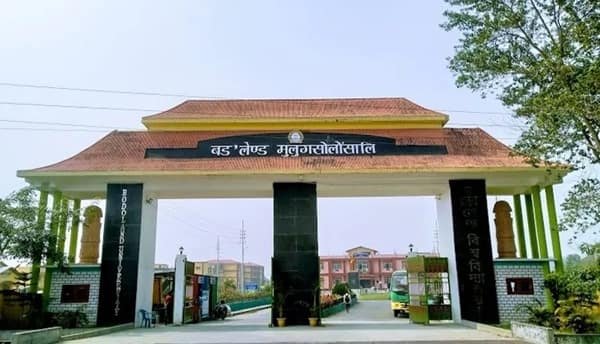
Quick About Bodoland University
| Particular | Details |
| Official name | Bodoland University |
| University type | State university |
| Established | 2009 |
| Location | Rangalikhata, Kokrajhar, Assam |
| Accreditation | NAAC Grade B |
| Main website | buniv.edu.in |
| Admission notices | https://www.buniv.edu.in/tender/admission-notice |
| Result notices | https://www.buniv.edu.in/tender/result-notice |
| Student login / e-Samarth | https://buniv.edu.in/sub-pages/e-samarth |
| Academic structure | University departments and affiliated colleges |
Courses and Admission Routes
Bodoland University publishes separate admission notices for two-year master’s programmes, B.Ed/M.Ed, MBA/MCA, FYIMP and other diploma or certificate programmes. Some courses use an entrance examination; others publish merit lists and counselling or spot-admission rounds. Affiliated-college admissions can have additional reporting and verification requirements.
For 2026-27, the university has issued programme-specific notices throughout the admission cycle, including merit-list publication, entrance-test schedules and final spot-admission rounds. Candidates should therefore read the exact notice for the course and session rather than rely on an old admission calendar.
Bodoland University Admission Procedure
1. Open the current admission-notice page. Start at buniv.edu.in and identify the 2026-27 notice for the exact programme, campus or affiliated college.
2. Check eligibility and the selection route. Confirm whether admission is based on an entrance test, qualifying marks, merit list, interview, counselling or a spot-admission process.
3. Register on the portal named by the university. Use the Samarth/application link stated in the notice and enter the candidate name, email, mobile number and academic details accurately.
4. Upload the required records. Provide marksheets, photograph, signature and category or programme-specific certificates in the prescribed format.
5. Pay only through the authorised system. Save the application number, transaction reference and submitted-form acknowledgement.
6. Appear for the entrance test or verification where required. B.Ed/M.Ed, MBA or other programmes may have separate test or counselling schedules.
7. Track merit lists and admission rounds. Check the university admission-notice page for provisional merit, counselling, spot-admission and vacancy updates.
8. Complete reporting and student registration. If selected, pay the admission fee, produce originals and complete university/e-Samarth registration within the notified deadline.
Documents Commonly Required for Admission
• Class 10 certificate or accepted proof of date of birth
• Class 12 mark sheet and pass certificate where relevant
• Degree/semester mark sheets and degree/provisional certificate for postgraduate admission
• Entrance-test admit card, score or merit/counselling document where applicable
• Recent photograph, signature and government-issued identity proof
• Category, EWS, disability or other reservation certificate where applicable
• Transfer, migration or eligibility certificate when required
• Application form, merit/allotment record and payment receipts
How To Check Bodoland University Result
1. Open the official Result Notice page. Go to buniv.edu.in/tender/result-notice or use Results from the main university website.
2. Match the programme and semester. Bodoland University publishes results separately for FYUGP, PG, B.Ed/M.Ed, LL.B and other examinations, including regular, arrear, supplementary, betterment, rechecking and re-evaluation results.
3. Open the exact result notice. Check the batch, examination year and semester carefully before relying on the document or linked result page.
4. Use e-Samarth when student-specific access is required. For a personal academic record, sign in through the university e-Samarth route if the current notice directs students there.
5. Save the result and obtain the formal record. Keep the published result for immediate reference and obtain the official marksheet, grade card or certificate when required for formal use.
Bodoland University Student Login
Bodoland University links an e-Samarth page with Student Login, Faculty Login, HOD Login and University Login options. Enrolled students should use the Student Login route rather than staff or administrative logins. Admission applications and public result notices can still remain separate from the student account.
1. Open the official e-Samarth page. Use the link from buniv.edu.in and select Student Login.
2. Enter the issued student credentials. Use the registration/enrolment-linked username and password created or provided through the university process.
3. Check the student profile. Verify the name, programme, semester and registration details before submitting any academic action.
4. Use recovery/support if the login fails. Follow the official recovery method or contact the university/college; do not create duplicate student identities.
5. Keep academic acknowledgements. Save registration and fee confirmations until the corresponding service is reflected in the student record.
Important Checks Before Paying Any Fee
• Use only buniv.edu.in, the university-linked Samarth route or another portal named in an official notice.
• Confirm whether the payment is for application, entrance test, admission, semester renewal, examination, hostel or another service.
• Match the candidate/student name, programme and application/registration number before payment.
• If money is debited but the portal is pending, save the reference and do not immediately pay a second time.
• Keep merit/allotment notices and payment receipts until enrolment or the academic transaction is complete.
Frequently Asked Questions
Q1. Does Bodoland University use one admission process for every programme?
No. The university issues separate notices for different programmes, and selection may involve an entrance test, merit list, counselling or spot admission.
Q2. Where should a student check the latest Bodoland University semester result?
Use the official Result Notice page on buniv.edu.in and select the exact programme, semester, batch and examination type.
Q3. Why can a result be available in a notice even if it is not visible in the student login?
Public result notices and student-specific Samarth records are separate publication channels. The student should first confirm that the result notice covers the correct batch and then check the personal record.
Q4. Is the admission account the same as the e-Samarth student account?
Not necessarily. The application account is used during admission, while e-Samarth becomes important for enrolled-student registration and academic services.
Q5. What should a student do if the wrong course or semester appears after login?
Do not submit a payment or examination action against the wrong record. Contact the department, affiliated college or university office with the registration details so the academic record can be corrected.
Q6. Can students rely on unofficial result websites if the university site is slow?
They should use the university notice/result system for final verification. Third-party pages may copy old or incomplete data and should not replace the official result or marksheet.