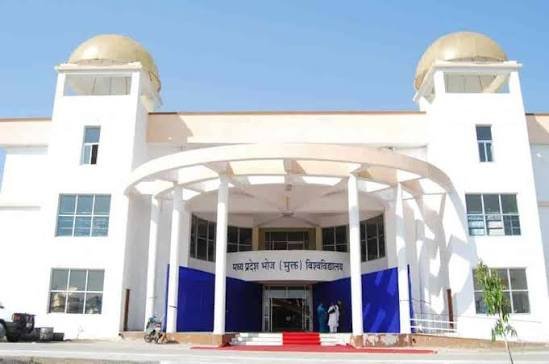
Bhoj University commonly refers to Madhya Pradesh Bhoj (Open) University (MPBOU), a state open university based in Bhopal. Established under a Madhya Pradesh State Assembly Act in 1991, the university was created to expand access to higher education through open and distance learning. It serves learners through regional and study centres and offers undergraduate, postgraduate, diploma, certificate, professional and special-education programmes. Its flexible model is especially relevant for students who cannot follow a conventional full-time campus schedule.
The university uses more than one online route. The main MPBOU website publishes notices and results, while MPOnline hosts admission forms, examination forms, certificate services and the Student Information System (SIS). For the 2026-27 session, the official MPOnline service page lists active admission forms for several UG, PG, diploma and certificate categories. Because a student can encounter separate admission, result and SIS screens, this guide explains what each one is for and how to avoid using the wrong portal.
Quick About
| Particular | Details |
| Official name | Madhya Pradesh Bhoj (Open) University |
| Common name | Bhoj University / MPBOU |
| University type | State Open University |
| Established | 1991 |
| Headquarters | Kolar Road, Bhopal, Madhya Pradesh – 462016 |
| Mode | Open and Distance Learning (ODL) |
| Main website | mpbou.edu.in |
| Online admission | mpbou.mponline.gov.in |
| Results | mpbou.edu.in/results |
| Student / SIS login | MPOnline SIS Login |
Courses and Admission Routes
MPBOU offers programmes across arts, commerce, science, management, information technology, journalism, library science, education, special education and other areas through open and distance learning. Not every programme opens in every session, and professional or special-education courses can have additional eligibility, entrance or regulatory requirements.
For the current session, candidates should check the MPBOU main website and the live MPOnline admission-services page. The active form itself shows the session, student category and course group. A new student should not select an old-student, examination or re-registration form simply because the course name looks similar.
Bhoj University Admission Procedure
1. Check whether the programme is open for the current session. Start at mpbou.edu.in and follow Online Admission to the official MPOnline service. Confirm the course group, year and session shown on the form.
2. Choose the correct student category. MPOnline can show separate forms for new students, continuing students, UG, PG, diploma, certificate and professional programmes. Selecting the wrong category can create an unusable application.
3. Enter personal and contact details carefully. Use the candidate name, date of birth, mobile number and email exactly as required. Keep the contact details active for status and recovery messages.
4. Fill the academic and study-centre information. Enter the qualifying examination and choose the appropriate programme, regional centre or study centre where the application requires it.
5. Upload the requested documents. Provide clear copies of marksheets, photograph, signature, identity and reservation or eligibility documents in the format stated by the portal.
6. Pay through MPOnline and save the receipt. Confirm the form type and session before payment. Save the application number, transaction ID and generated receipt.
7. Check admission confirmation and student details. Use the portal status/receipt facilities and university notices. Admission is subject to eligibility verification and the conditions for the chosen programme.
8. Complete SIS registration after admission where required. The MPBOU service portal advises admitted students to register in SIS. Use the enrolment number and date of birth or the credentials requested by the SIS system.
Documents Commonly Required for Admission
The exact document list differs by programme and learner category. Common records include:
- Class 10 certificate or mark sheet for date-of-birth and basic academic verification
- Class 12 mark sheet and pass certificate for undergraduate admission, where applicable
- Degree/semester mark sheets and degree or provisional certificate for postgraduate admission
- Entrance-test scorecard, rank card or selection document where the programme requires one
- Recent photograph, signature and government-issued identity proof
- Transfer, migration, conduct or eligibility certificate when required at final enrolment
- Category, domicile, disability, scholarship or other supporting certificates where applicable
Open and distance-learning admission can also require DEB-ID/ABC-ID or programme-specific regulatory documents. Special-education and teacher-education programmes should follow the exact current notification and not a generic document list.
How To Check Bhoj University Result
1. Open the official MPBOU result area. Go to mpbou.edu.in/results or use Results from the main university website. Recent programme-wise result notices are published there.
2. Open the student result search when needed. The university also provides a result-search page where students can choose programme, course and year and enter a roll number or registration number.
3. Select the exact programme and examination year. Similar course names can have old, NEP, previous-year, final-year or supplementary result entries, so choose the record matching the student.
4. Enter the roll or registration details accurately. Remove accidental spaces and use the number exactly as issued by the university.
5. Save the displayed result for reference. Check the student identity, programme, year, subject information and result status. Obtain the official mark sheet or certificate for formal use.
MPBOU publishes results in stages by programme and examination session. If a current result is not listed, first confirm that it has actually been declared before treating the absence as a portal problem.
Bhoj University Student Login
MPBOU uses the MPOnline Student Information System (SIS) for enrolled-student services. The MPOnline main service page also separates SIS from admission forms, examination forms and certificate applications.
1. Open the official SIS login. Use the MPOnline Bhoj Student Management System login page reached from mpbou.mponline.gov.in.
2. Use the student username and password. Enter the credentials created or issued for the SIS account. New users should use the official registration option rather than creating unrelated accounts.
3. Use Reset/Forgot Password if access is lost. Follow the portal recovery process and use the registered identity details.
4. Check the enrolment and programme record. Make sure the enrolment number, name and course are correct before using SIS services or paying a fee.
5. Use the correct MPOnline module for each task. Admission, exam forms, certificates, results and SIS are separate services. A successful SIS login does not mean every university transaction is done in SIS.
Students should keep the enrolment number, application receipt and registered mobile details safely because these are commonly needed across MPBOU online services.
Important Checks Before Paying Any Fee
- Use MPOnline links reached from mpbou.edu.in for admission, exam and student transactions.
- Check the session, programme, new/old student category and enrolment/application number before payment.
- Do not pay through a privately shared QR code or agent account when the same transaction is available on the official MPOnline service.
- If payment is debited but the receipt is not generated, save the bank reference and use MPOnline help/support before paying again.
- Retain admission and examination receipts until the corresponding student record or form status is confirmed.
Frequently Asked Questions
Q1. Is Bhoj University the same as Madhya Pradesh Bhoj (Open) University?
Yes. Madhya Pradesh Bhoj (Open) University is the official name, while Bhoj University and MPBOU are common shorter references.
Q2. Can I apply for any MPBOU course through one common form?
No. MPOnline lists forms by programme group, session and student category. Choose the exact form for the course and whether you are a new or continuing student.
Q3. Why does MPBOU ask admitted students to register in SIS?
SIS creates the enrolled-student service account used for student information and certain online functions. It is separate from simply submitting an admission form.
Q4. What if I selected the wrong course or session in the admission form?
Do not submit a second conflicting application without checking the portal correction facility. Use the Edit Student Details option where permitted or contact the authorised MPOnline/university support channel.
Q5. Why can my result be absent even when another MPBOU result has been published?
Results are released programme-wise and session-wise. A result announcement for another course, year or examination does not mean your result has been declared.
Q6. Is the downloaded online result the final original mark sheet?
It is useful for checking the declared outcome, but formal use may require the university-issued mark sheet, degree, provisional certificate or another authenticated academic record.