Indira Gandhi National Open University (IGNOU) is India’s national open university and one of the country’s largest higher-education systems by learner reach. It was established by an Act of Parliament in 1985 and is headquartered at Maidan Garhi, New Delhi. Unlike a conventional residential university, IGNOU is built around open and distance learning, online education, Regional Centres, Learner Support Centres, self-learning material, digital resources, counselling and term-end assessment. It offers undergraduate, postgraduate, diploma, postgraduate diploma, certificate and other programmes across a wide range of academic and professional areas. IGNOU’s current July 2026 prospectus states that the university holds the highest NAAC A++ grade and is ranked No. 1 among Open Universities in the NIRF rankings for 2024 and 2025.
For students, the main challenge is not finding a website but choosing the correct IGNOU system. Fresh ODL admission uses the Samarth ODL portal, fully online programmes use a separate Online Programme portal, and fixed-intake programmes can have another admission route. After admission, students are asked to create an account on the IGNOU Samarth Student Portal. Examination forms, re-registration, term-end results, grade cards, admission status, assignments and other services are also handled through separate official pages. A learner who understands those differences is far less likely to submit a duplicate registration, pay on the wrong portal or mistake a provisional term-end result for the final completed grade card.
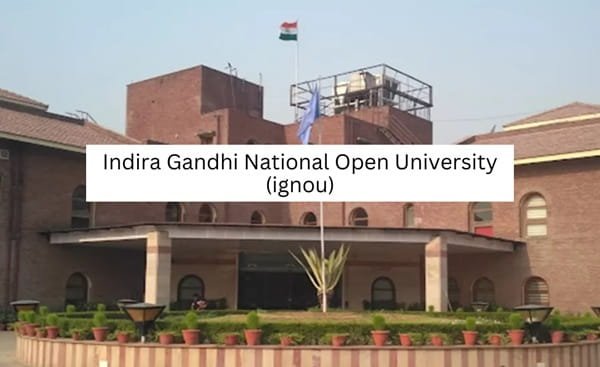
Quick About Indira Gandhi National Open University
| Particular | Details |
| Official name | Indira Gandhi National Open University (IGNOU) |
| University type | Central Open University / National Open University |
| Established | 1985 |
| Headquarters | Maidan Garhi, New Delhi – 110068 |
| Accreditation | NAAC A++ |
| Main website | https://www.ignou.ac.in/ |
| ODL fresh admission | https://ignouadmission.samarth.edu.in/ |
| Online programme admission | https://ignouiop.samarth.edu.in/ |
| Student portal after admission | https://ignou.samarth.edu.in/ |
| Term-End Result | https://termendresult.ignou.ac.in/ |
| Grade Card | https://gradecard.ignou.ac.in/ |
| Admission/registration status | https://isms.ignou.ac.in/changeadmdata/AdmissionStatusNew.ASP |
Courses and Admission Routes
IGNOU offers a very large mix of ODL and online programmes, but every course should not be treated as if it follows the same admission route. The July 2026 Common Prospectus lists separate portals for ODL programmes, Online programmes and Fixed Learner Intake Programmes. Most common-prospectus ODL admissions are submitted through ignouadmission.samarth.edu.in, while online programmes use ignouiop.samarth.edu.in. Entrance-based and fixed-intake programmes can have additional notifications, tests, counselling or merit procedures.
IGNOU generally runs January and July admission cycles for notified programmes. The active programme list can change from one cycle to another, so applicants should read the current prospectus and live Samarth portal before registering. Existing learners should also distinguish fresh admission from re-registration: re-registration is for continuing into the next year or semester and uses a separate portal. Creating a new fresh-admission account when the student only needs re-registration can cause unnecessary confusion.
IGNOU Admission Procedure
1. Choose ODL, Online or another notified programme route. Start at ignou.ac.in and confirm whether the programme is offered through Open and Distance Learning, fully Online mode or a fixed-intake/entrance-based process. Use the portal named in the current prospectus.
2. Check programme eligibility and the current admission cycle. Read the minimum qualification, age rule if any, medium, duration, fee, Regional Centre/Learner Support Centre requirements and any entrance or professional condition before registration.
3. Create a new registration on the correct Samarth portal. Use a valid personal email address and mobile number. Create the username/password and keep them secure because the same applicant account is used to complete and track the admission form.
4. Select the programme and learner-support details carefully. Choose the programme, Regional Centre and Study/Learner Support Centre as requested. Enter personal and academic information exactly as shown on the supporting certificates.
5. Upload the prescribed documents. Upload the photograph, signature, educational certificates and category/experience documents in the required format. Clear scans are important because admission is subject to document verification.
6. Pay the programme fee through the official portal. Use net banking, card, UPI or the payment mode enabled by the current Samarth system. Save the control/reference number and acknowledgement after successful submission.
7. Track the admission status and respond to any discrepancy. Use the applicant dashboard and official admission/registration status service. If IGNOU asks for a corrected document or additional information, complete it within the stated period rather than opening another application.
8. After confirmation, create/use the Student Portal account. Once admission is confirmed and an enrolment number is issued, register on ignou.samarth.edu.in as instructed. Keep the enrolment number because it is central to student services, examination forms, results and grade-card checks.
Documents Commonly Required for Admission
• Recent passport-size photograph
• Scanned signature
• Class 10 or other accepted proof of date of birth
• Qualifying examination mark sheet/certificate for the chosen programme
• Higher qualification records where a PG or advanced programme requires them
• SC, ST, OBC-NCL, EWS or other category certificate where applicable
• Experience certificate or professional document for programmes that require work experience
• Government identity and other programme-specific documents requested by the live portal
The exact checklist depends on the programme and applicant category. Entrance-based programmes such as B.Ed., Post Basic B.Sc. Nursing or other fixed-intake courses can require an entrance record, counselling documents or additional certificates. Applicants should follow the current prospectus and programme notification rather than a generic document list copied from an older admission cycle.
How To Check IGNOU Result
IGNOU separates the Term-End Examination result from the Grade Card. The Term-End Result page shows the marks/status uploaded for the selected examination or re-evaluation cycle. The Grade Card combines the academic components recorded for the programme and course, such as term-end examination, assignments or other applicable components. Both online displays are informational; the IGNOU result site itself warns that the electronically generated information is indicative and should not be treated as a substitute for the formal final academic record.
1. Open the official Term-End Result portal. Go to https://termendresult.ignou.ac.in/ or use Results from ignou.ac.in. Select the relevant TEE/re-evaluation session shown on the page.
2. Enter the enrolment number exactly. Use the current IGNOU enrolment number and select any programme/result options requested by the portal. Avoid spaces or digits copied from an old admission application number.
3. Check whether the result is complete or still being updated. IGNOU uploads results in phases. A missing course does not automatically mean failure; the current result page can state that more results are yet to follow.
4. Check the Grade Card separately. Go to https://gradecard.ignou.ac.in/, select the relevant grade-card status/programme and enter the enrolment number to see the recorded components and overall course status.
5. Use the correct follow-up service if something is wrong. For eligible TEE cases, IGNOU provides separate re-evaluation/copy-of-answer-script services. If an assignment, practical or project component is missing, first confirm that the concerned Regional/Study Centre has submitted and updated the marks.
IGNOU Student Login
The IGNOU Samarth Student Portal at ignou.samarth.edu.in is the main post-admission student account highlighted in the July 2026 Common Prospectus. IGNOU advises students to register on this portal after admission confirmation and create their Student Account. The portal is used for services such as the student identity card and, for current term-end examinations, IGNOU directs learners to submit the examination form through the Student Portal on the Samarth platform.
1. Open https://ignou.samarth.edu.in/. Use the Student Portal after admission has been confirmed. A fresh-admission applicant who has not yet received enrolment confirmation should continue to use the admission portal for application tracking.
2. Register the student account if required. Use New Registration and enter the enrolment/identity and contact information requested by the portal. Use the same official student details rather than creating multiple identities.
3. Sign in with the registered username and password. Use the recovery facility if credentials are forgotten. If the registered email or mobile number cannot be accessed, contact the Regional Centre for the authorised correction/reset process.
4. Use the correct service module. Student Portal functions can include ID card and examination-related services, but re-registration, results and grade cards still have separate official pages. One login should not be assumed to replace every IGNOU service.
5. Keep the enrolment number and acknowledgements permanently. The enrolment number is required across many IGNOU systems. Save admission confirmation, re-registration receipts, examination-form acknowledgement and result/grade-card records for later reference.
Important Checks Before Paying Any Fee
• Use ignou.ac.in and the current Samarth portal for the exact ODL, Online or fixed-intake programme; do not pay through a private admission agent.
• Check whether the payment is for fresh admission, re-registration, term-end examination, re-evaluation, convocation or another separate service.
• Match the programme code, applicant/student name and enrolment number before payment.
• Save the control number, payment reference and acknowledgement until the status becomes successful in the official system.
• If an amount is debited but the portal does not update, check the payment-status/help facility and contact the authorised IGNOU/Regional Centre channel before making another payment.
Frequently Asked Questions
Q1. What is the difference between IGNOU ODL admission and Online Programme admission?
ODL programmes use the open and distance-learning structure with Regional/Learner Support Centre support and the ODL Samarth admission portal. Fully online programmes use a separate online admission portal and online delivery structure. Applicants should choose the mode listed for the exact programme.
Q2. Is IGNOU re-registration the same as taking fresh admission again?
No. Re-registration is for an existing learner continuing into the next eligible semester or year. It uses the re-registration portal. A continuing student should not submit a new fresh-admission form unless IGNOU specifically requires a new admission.
Q3. Why is my IGNOU Term-End Result showing only some subjects?
IGNOU states that term-end results are uploaded in phases and may be incomplete while more results are being processed. Check again after updates and compare the Grade Card before raising a missing-result grievance.
Q4. What is the difference between the IGNOU result and Grade Card?
The Term-End Result shows the examination/re-evaluation result for the selected cycle, while the Grade Card brings together the academic components recorded for the programme and courses. The final programme grade card is completed only after all prescribed components are updated.
Q5. When should a newly admitted learner use the IGNOU Samarth Student Portal?
The July 2026 prospectus advises students to register on the Student Portal after confirmation of admission. The learner should first obtain/confirm the enrolment record and then create or use the student account.
Q6. How can I check whether my IGNOU admission has actually been confirmed?
Use the official applicant dashboard and the Admission/Registration Status service. The status system uses the enrolment number and programme code and can show the confirmed registration details.
Q7. What should I do if assignment marks are missing from the Grade Card?
First confirm that the assignment was submitted to the correct centre and that enough processing time has passed. Keep the submission acknowledgement and contact the concerned Study Centre/Regional Centre or authorised evaluation channel if the component remains missing.