Patliputra University, Patna is a state public university created in 2018 to administer a large group of colleges and postgraduate departments in the Patna and Nalanda region of Bihar. Its headquarters are at Kankarbagh in Patna, while teaching and examination activity extends across constituent and affiliated colleges. This makes the university relevant to a very large number of regular undergraduate and postgraduate students, but it also means that applicants should first identify whether they are applying to a university department, constituent college or affiliated college before following an admission notice.
For the 2026-27 cycle, Patliputra University has moved important admission activity to its Samarth admission system while continuing to maintain separate university pages for admission notices, results, registration and examinations. Those systems should not be treated as one universal portal. A candidate may apply through the current Samarth admission link, later use the university registration/examination system for academic formalities, and check declared results through the dedicated result portal. The guide below keeps those stages separate so that students do not accidentally use an older admission link or confuse an application account with post-admission examination services.
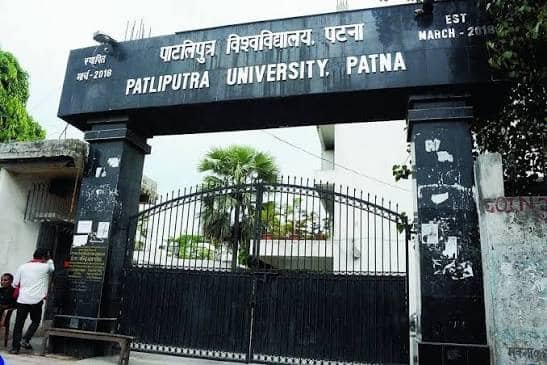
Quick About Patliputra University
| Particular | Details |
| Official name | Patliputra University, Patna |
| Common name | Patliputra University / PPU |
| University type | State public university |
| Established | 18 March 2018 |
| Headquarters | Old Bypass Road, Kankarbagh, Patna – 800020, Bihar |
| Academic jurisdiction | University departments plus constituent and affiliated colleges mainly in Patna and Nalanda districts |
| Main website | https://ppup.ac.in/ |
| 2026 admission notices | https://ppup.ac.in/admission-notice |
| 2026 Samarth admission portal | https://ppupadm.samarth.edu.in/ |
| Result portal | https://ppup.ac.in/result-portal |
| Registration / examination portal | https://ppup.ac.in/examination-registration-portal |
Courses and Admission Routes
Patliputra University offers regular undergraduate, postgraduate, vocational, professional and research programmes through its university departments and colleges. The admission route is not identical for every programme. The university publishes separate notices for regular UG, vocational UG, BA-LLB, PG regular/self-finance, professional courses and other categories, and later rounds can be opened when seats remain available.
For 2026 admissions, applicants should begin with the Admission Notice or Admission Portal page on ppup.ac.in and follow the Samarth link or programme-specific link named there. The current prospectus or notice controls eligibility, merit calculation, reservation, subject requirements, application fee, correction dates, choice filling, merit lists and reporting. An old PPU admission URL should not be used simply because it still appears in a search result.
Patliputra University Admission Procedure
1. Open the current admission notice. Go to https://ppup.ac.in/admission-notice and identify the notice for the exact programme and 2026-27 session. Check whether the course is regular, vocational, professional, postgraduate or another category.
2. Use the portal named by PPU. For programmes directed to the 2026 Samarth system, use https://ppupadm.samarth.edu.in/. If the notice names another university-linked portal, follow that route instead of an old bookmarked page.
3. Check eligibility before registration. Confirm the qualifying examination, required subjects, minimum marks, reservation conditions and any course-specific entrance or merit rule. Applicants from another board or university should also check migration or equivalency requirements.
4. Create the applicant account carefully. Use an active mobile number and email address and enter the candidate name, date of birth and identity details exactly as shown on the academic certificates.
5. Enter academic details and upload documents. Fill marks, board/university, passing year, category and programme choices accurately. Upload the photograph, signature and certificates in the prescribed format.
6. Pay only through the authorised portal. Confirm the candidate name, programme and application number before payment. Save the transaction reference and completed application acknowledgement.
7. Track merit lists and admission rounds. Check PPU admission notices and the applicant dashboard for merit lists, allocation, counselling or spot-admission instructions. A submitted application does not itself guarantee a seat.
8. Complete reporting and university registration. If selected, follow the college/department verification and fee deadline. Keep the admission receipt and enrolment details because the registration/examination system becomes important after admission.
Documents Commonly Required for Admission
The exact checklist depends on the programme and admission category. Common records include:
• Class 10 certificate or another accepted proof of date of birth
• Class 12 mark sheet and pass certificate for undergraduate admission
• Graduation mark sheets and degree/provisional certificate for postgraduate admission
• Recent photograph, signature and government-issued identity proof
• Category, EWS, disability, domicile or other reservation certificate where applicable
• Transfer, migration, character or eligibility certificate when required
• Entrance/merit/allotment document for programmes that use such a selection stage
• Application printout and all fee/payment receipts
The current programme notice should be treated as the final checklist. A certificate can be rejected at verification if its format, issue date or category details do not meet the current admission rules even when the online form was accepted.
How To Check Patliputra University Result
1. Open the official PPU result portal. Use https://ppup.ac.in/result-portal or reach Results through the main university website rather than a third-party result page.
2. Choose the correct examination or result link. Match the programme, part/semester, academic session and examination type. Regular, vocational, professional or special results can be published separately.
3. Enter the student details requested by the portal. Use the roll number, registration number or other examination identity exactly as shown on the admit card or university record.
4. Verify the displayed result carefully. Check the student name, course, college, semester/year, papers, marks or grades and result status. A wrong examination selection can return no record even after the result has been declared.
5. Save the result and obtain formal records when required. Keep a PDF/printout for immediate reference, but use the university-issued marksheet, consolidated record, transcript or degree for formal verification.
PPU results are released examination-wise. If a record is not visible, first confirm that the exact course and session have been declared and that the correct result link is being used before reporting a technical problem.
Patliputra University Student Login
PPU does not need one all-purpose login for every stage. The 2026 Samarth admission account is for applicants, while registration and examination formalities are handled through the university’s separate Registration / Examination Portal. Result access is also separate.
1. Identify the service you need. For admission use the current Samarth/admission portal; for enrolment or exam-form activity use the Registration / Examination Portal linked by PPU.
2. Open the portal from ppup.ac.in. This is safer than searching for a generic “PPU student login,” because old admission and examination pages can remain indexed online.
3. Use the correct student identifier. Enter the application number, registration number, roll number, mobile/email or password requested by that specific service. Do not assume one ID works on every PPU system.
4. Verify the academic profile before submitting anything. Check the name, course, college and session before paying an examination fee or sending an online request.
5. Use official recovery/support if access fails. Do not create a second admission or registration identity simply because a password is lost. Use the recovery facility or the university/college examination channel.
Important Checks Before Paying Any Fee
• Use only ppup.ac.in, the current PPU Samarth portal, or another service directly linked in an official PPU notice.
• Check the candidate/student name, programme, session and application/registration number before payment.
• Confirm whether the payment is for admission, seat confirmation, college fee, registration, examination or another service.
• If money is debited but the portal remains pending, save the bank reference and avoid an immediate duplicate payment.
• Keep application, merit/allotment, admission and examination receipts until the corresponding university record is fully updated.
Frequently Asked Questions
Q1. Are Patliputra University and Patna University the same university?
No. They are separate universities. Patliputra University was created in 2018 and has jurisdiction over many colleges in Patna and Nalanda, while colleges attached to Patna University remain under Patna University.
Q2. Should a 2026 applicant use an old PPU admission portal found in Google search?
No. Start with the current Admission Notice page on ppup.ac.in. For the 2026 cycle, PPU directs candidates to its Samarth admission system for the programmes covered there.
Q3. Can a PPU Samarth admission login be used for every examination service later?
Not necessarily. Admission and post-admission examination/registration services are separate. Use the Registration / Examination Portal or other service specifically named in the current university notice.
Q4. Why might a declared PPU result not appear for a valid roll number?
The wrong course, semester, examination session or result category may have been selected, or the exact result may not yet have been uploaded. Confirm the declaration notice first and then contact the college/university examination section if the record is still missing.
Q5. Does appearing in a PPU merit list automatically complete admission?
No. The candidate can still have to complete document verification, fee payment and reporting at the allotted college or department within the deadline.
Q6. What should a student do if an online PPU payment is debited but the status is pending?
Keep the transaction ID, bank reference and screenshot and use the official portal help or college/university office before paying again. A second immediate payment can create a duplicate-payment issue.