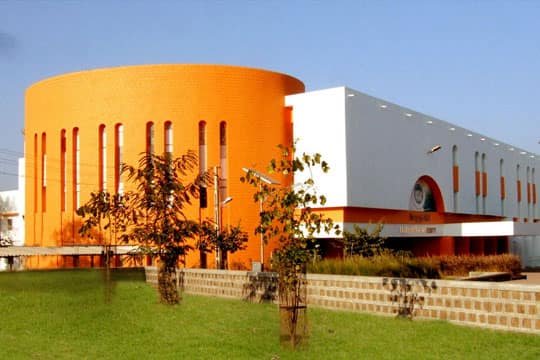
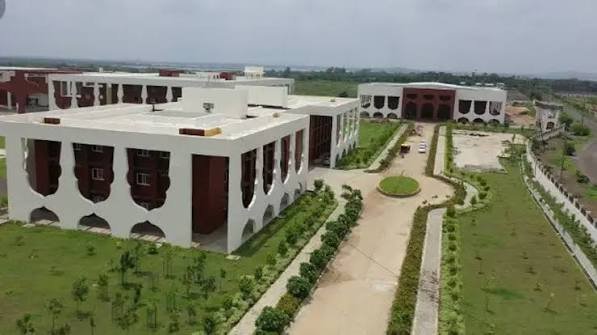
BBD University is the commonly used name for Babu Banarasi Das University, a state private university in Lucknow established in 2010 under an Uttar Pradesh state Act. The university is part of the wider BBD educational group but has its own university identity, degree programmes and examination system. Its campus at BBD City on Ayodhya Road offers undergraduate, postgraduate, integrated, professional and doctoral programmes across engineering, computer applications, management, law, education, architecture, pharmacy, dental sciences, basic sciences, humanities and other fields.
For applicants, it is important to separate the university from other BBD group institutions with similar names. BBDU operates an official admissions website for university programmes, while enrolled students use the university examination/student systems for academic results and examination activity. The Exam Cell also provides a public result search using the university roll number and identity details. This guide therefore focuses specifically on Babu Banarasi Das University (BBDU), not on another BBD college, and explains the correct official routes for admission, result checking and student login.

| Particular | Details |
| Official name | Babu Banarasi Das University |
| Common name | BBD University / BBDU |
| University type | State private university |
| Established | 2010 |
| Main campus | BBD City, Ayodhya Road, Lucknow, Uttar Pradesh – 226028 |
| Main website | https://bbdu.ac.in/ |
| Admissions website | https://admissions.bbdu.ac.in/ |
| Result portal | https://examcell.bbdu.ac.in/ |
| Student Exam Cell login | https://examcell.bbdu.ac.in/bbduexamcell/ |
| Admission contact | admission@bbdu.ac.in |
Courses and Admission Routes
BBDU offers a broad set of programmes, and the selection method depends on the course. Some programmes admit primarily on qualifying-examination eligibility and university procedure, while professional programmes can consider national-level entrance scores or regulatory requirements. For example, law pages can give preference to CLAT, MBA eligibility refers to recognised management entrance examinations, and health/professional programmes can have additional statutory conditions.
Applicants should therefore open the exact programme page on the BBDU admissions website rather than rely on a generic statement that one entrance test applies to the whole university. The live programme page and admission communication should control eligibility, required documents, fee and final seat-confirmation conditions.
BBD University Admission Procedure
1. Start at the official BBDU admissions website. Open https://admissions.bbdu.ac.in/ and select the exact university programme.
2. Check programme eligibility before registering. Confirm minimum marks, required subjects, accepted entrance scores and any programme-specific regulatory condition.
3. Register through the official Apply Now route. Enter the candidate’s correct name, phone number and email. Use contact details that will remain active throughout admission.
4. Complete the online application. Fill personal and academic details carefully and upload the records requested by the university.
5. Pay only through the authorised BBDU admission channel. Save the application/reference number, transaction details and acknowledgement.
6. Submit entrance-score or additional programme evidence where required. If the programme considers CLAT, CAT/MAT/XAT/CMAT or another recognised score, enter the details in the manner requested by BBDU.
7. Track the university’s admission communication. Check the registered email/mobile and official portal for counselling, document verification, fee or reporting instructions.
8. Complete final enrolment. Pay the prescribed admission/course fee and submit original or verified documents within the period stated by the university.
Documents Commonly Required for Admission
The exact requirements depend on the school and programme. Common records include:
• Class 10 certificate or accepted proof of date of birth
• Class 12 mark sheet and pass certificate for UG programmes
• Graduation mark sheets and degree/provisional certificate for PG programmes
• Entrance scorecard where the programme uses or prefers an external examination
• Recent passport-size photograph and signature
• Government-issued identity proof
• Transfer, migration, character or eligibility certificate when required
• Category/reservation or programme-specific statutory certificates where applicable
• Application acknowledgement and payment receipts
Professional programmes such as pharmacy, education, law, architecture, dental or other regulated courses may require additional documents. The current programme page and admission letter should be followed over a generic checklist.
How To Check BBD University Result
1. Open the official BBDU Result portal. Go to https://examcell.bbdu.ac.in/ rather than a third-party result website.
2. Enter the University Roll Number. Use the roll number exactly as issued by Babu Banarasi Das University.
3. Complete the identity fields requested by the page. The result system can ask for the first letters of the student’s name and mother’s name before showing the record.
4. View and verify the result. Check the student identity, programme, examination, subject-wise marks/grades and result status.
5. Save the result and obtain formal documents when needed. Keep the online result for immediate reference and use the official marksheet, transcript, provisional certificate or degree for formal verification where required.
BBDU also maintains result routes for specific categories such as scrutiny or particular professional examinations. Students should use the result link appropriate to their programme/examination rather than assume every result appears through one identical form.
BBD University Student Login
The BBDU Exam Cell provides a Student Login for enrolled students. This is separate from the pre-admission website used by applicants before enrolment. Students should use the university roll/student credentials issued after admission.
1. Open the official Exam Cell Student Login. Use https://examcell.bbdu.ac.in/bbduexamcell/.
2. Enter the student identity requested by the portal. Use the details that match the university academic record.
3. Use the recovery facility if available. If access is lost, follow the official reset/help process rather than sharing personal academic information with an agent.
4. Check the programme and examination details after login. Make sure the student record is correct before relying on examination information or submitting a request.
5. Keep admission and academic systems separate. The admissions website is for applicants; Exam Cell/student systems are for enrolled-student examination services and results.
BBD University also publishes student notices and academic updates on bbdu.ac.in. If an Exam Cell function is unavailable, students should use the current university notice or authorised examination office rather than an unofficial login page.
Important Checks Before Paying Any Fee
• Use bbdu.ac.in, admissions.bbdu.ac.in and examcell.bbdu.ac.in for the relevant official services.
• Confirm that the application is for Babu Banarasi Das University, not another BBD group institution with a similar name.
• Check programme, candidate/roll number and fee purpose before payment.
• If the amount is debited but the portal remains pending, retain the transaction proof and contact the official admission/accounts channel before paying again.
• Keep the application, admission communication and payment receipts until enrolment is fully confirmed.
Frequently Asked Questions
Q1. Are BBD University and Babu Banarasi Das University the same?
Yes. BBD University or BBDU is the commonly used short name of Babu Banarasi Das University, Lucknow.
Q2. Is every BBD educational institution in Lucknow part of the same university admission?
No. The BBD educational group includes more than one institution. Applicants should confirm that the programme page is specifically for Babu Banarasi Das University before paying or submitting documents.
Q3. Can a student check BBDU results without logging into the full student portal?
The official Exam Cell provides a result-search page where the student enters the university roll number and identity details. Other examination services may still require the Student Login.
Q4. What should a student do if the roll number does not show a declared result?
Confirm the exact examination/result category first. If the result has been released for the batch, contact the BBDU Exam Cell or concerned school with the roll number and examination details.
Q5. Does an external entrance score automatically confirm admission to BBDU?
No. Where an external score is considered or preferred, the candidate must still satisfy BBDU eligibility, application, verification, fee and enrolment requirements.
Q6. Is the online BBDU result enough for employment or higher studies?
It may be useful temporarily, but an employer or another university can require the formal marksheet, transcript, provisional certificate or degree issued through BBDU.